Nothing
Translate Request
In CopernicusMarine: Search Download and Handle Data from Copernicus Marine Service Information
knitr::opts_chunk$set(
  collapse = TRUE,
  comment = "#>"
)
Locating a dataset
You could use the R functions cms_product_details() and cms_product_metadata()
to look for Copernicus Marine Service data. If you prefer using a graphical user
interface, you can use the website to find a suitable dataset: https://data.marine.copernicus.eu/products.
Once you have located a suitable dataset on the website, the 'form' link can be used
to enter a subset of the data. The screen capture video below demonstrates how this
form can be used to specify a request. It also shows how you can copy this request,
in the form of command line (or Python) code, to the clipboard.
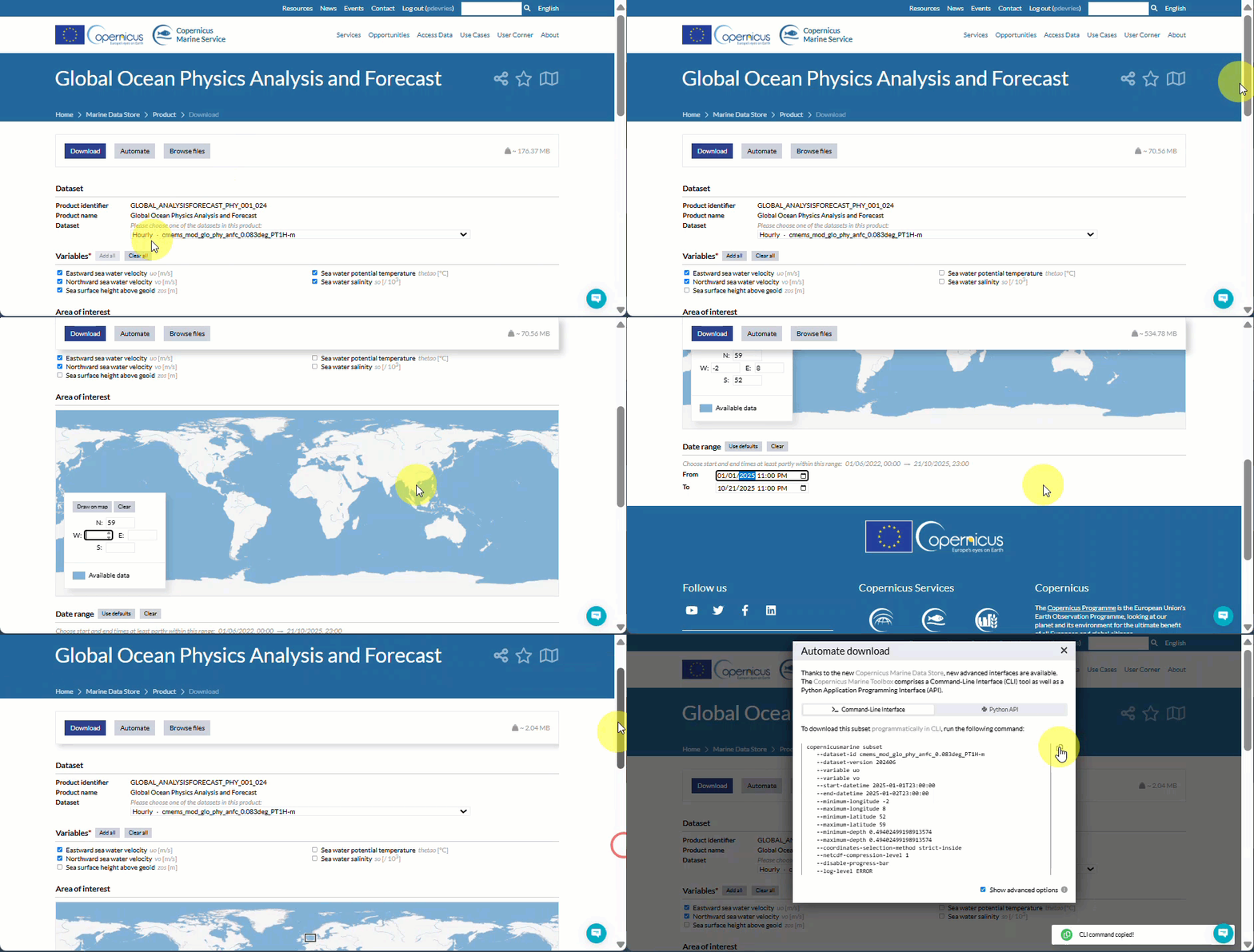
Once on the clipboard, you can translate the request code to an R named list with
cms_translate().
Download data with request
The example below demonstrates how the strategy above can be used to download a
subset of data. It shows how you can translate the command line code, obtained
from the website, can be translated into a named list.
library(CopernicusMarine)
## Example of command line code
## copied from website:
cli_code <-
"copernicusmarine subset
  --dataset-id cmems_mod_glo_phy_anfc_0.083deg_PT1H-m
  --variable uo
  --variable vo
  --start-datetime 2025-01-01T00:00:00
  --end-datetime 2025-01-01T23:00:00
  --minimum-longitude -2
  --maximum-longitude 8
  --minimum-latitude 52
  --maximum-latitude 59
  --minimum-depth 0.49402499198913574
  --maximum-depth 0.49402499198913574"

translated <- cms_translate(cli_code)
summary(translated)
Note that in the example above, the code is explicitly entered in the code
and passed as an argument to the cms_translate()-call. In most cases it is
not necessary. When you leave the text argument of cms_translate() empty,
it will look for a request on the system clipboard.
Now that you have translated the code, how can you actually download the data?
You can pass the named list as arguments to cms_download_subset() using
do.call(). Like this:
if (requireNamespace("blosc")) {
  result <- do.call(cms_download_subset, translated)
  plot(result, col = hcl.colors(100), axes = TRUE)
}
Try the CopernicusMarine package in your browser
Any scripts or data that you put into this service are public.
CopernicusMarine documentation built on Nov. 30, 2025, 5:06 p.m.
R Package Documentation
Browse R Packages
We want your feedback!
Note that we can't provide technical support on individual packages. You should contact the package authors for that.
knitr::opts_chunk$set( collapse = TRUE, comment = "#>" )
Locating a dataset
You could use the R functions cms_product_details() and cms_product_metadata()
to look for Copernicus Marine Service data. If you prefer using a graphical user
interface, you can use the website to find a suitable dataset: https://data.marine.copernicus.eu/products.
Once you have located a suitable dataset on the website, the 'form' link can be used to enter a subset of the data. The screen capture video below demonstrates how this form can be used to specify a request. It also shows how you can copy this request, in the form of command line (or Python) code, to the clipboard.
Once on the clipboard, you can translate the request code to an R named list with
cms_translate().
Download data with request
The example below demonstrates how the strategy above can be used to download a
subset of data. It shows how you can translate the command line code, obtained
from the website, can be translated into a named list.
library(CopernicusMarine) ## Example of command line code ## copied from website: cli_code <- "copernicusmarine subset --dataset-id cmems_mod_glo_phy_anfc_0.083deg_PT1H-m --variable uo --variable vo --start-datetime 2025-01-01T00:00:00 --end-datetime 2025-01-01T23:00:00 --minimum-longitude -2 --maximum-longitude 8 --minimum-latitude 52 --maximum-latitude 59 --minimum-depth 0.49402499198913574 --maximum-depth 0.49402499198913574" translated <- cms_translate(cli_code) summary(translated)
Note that in the example above, the code is explicitly entered in the code
and passed as an argument to the cms_translate()-call. In most cases it is
not necessary. When you leave the text argument of cms_translate() empty,
it will look for a request on the system clipboard.
Now that you have translated the code, how can you actually download the data?
You can pass the named list as arguments to cms_download_subset() using
do.call(). Like this:
if (requireNamespace("blosc")) { result <- do.call(cms_download_subset, translated) plot(result, col = hcl.colors(100), axes = TRUE) }
Try the CopernicusMarine package in your browser
Any scripts or data that you put into this service are public.
R Package Documentation
Browse R Packages
We want your feedback!
Note that we can't provide technical support on individual packages. You should contact the package authors for that.
Embedding an R snippet on your website
Add the following code to your website.
For more information on customizing the embed code, read Embedding Snippets.