In andrewheiss/raddath: Andrew's RStudio Addins




)-yellowgreen.svg)
knitr::opts_chunk$set(
  collapse = TRUE,
  comment = "#>",
  fig.path = "README-"
)
raddath
RStudio addins let you run R code or a Shiny app through the Rstudio IDE, either via the Addins dropdown menu or with a keyboard shortcut.
RStudio docs on addins (with examples):
https://rstudio.github.io/rstudioaddins/
To use addins:
- Run RStudio v0.99.878 or later
- Run
rstudioapi package v0.5 or later
install.packages("rstudioapi", type = "source")
- Populate your Addins dropdown menus with some examples
devtools::install_github("rstudio/addinexamples", type = "source")
Addins
Theme switching
This package provides two menu options for changing the RStudio theme. I use a dark Monokai theme normally, but this throws students off when I an teaching, so I like to use the default Textmate theme then.
- Set Light Theme: Use when teaching or presenting
- Set Dark Theme: Use at all other times
(code for this borrowed from David Severski)
view_object_addin
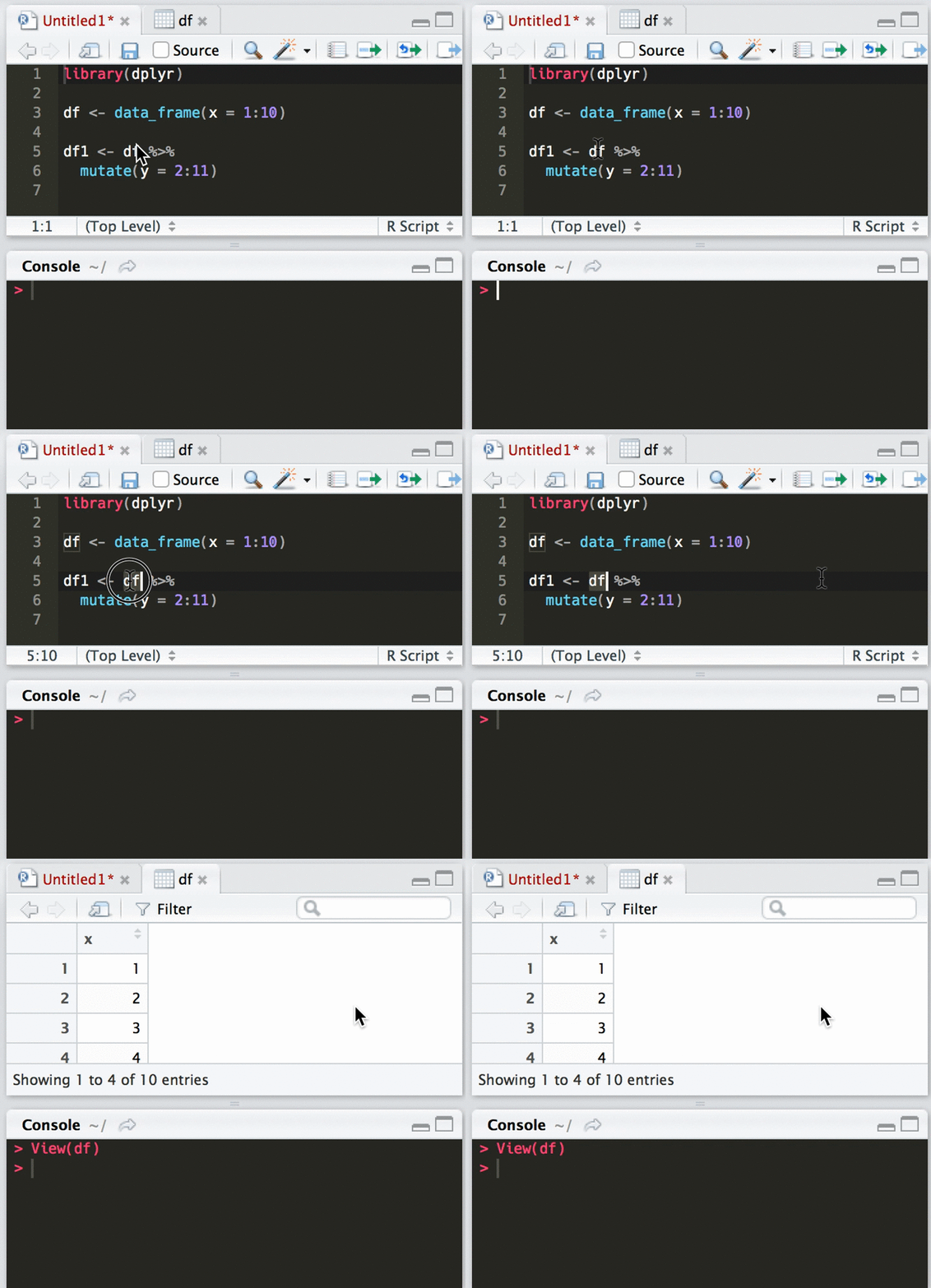
The view_object_addin takes selected text and pipes it into View() so you can inspect it in RStudio without typing the command in the console or finding and clicking on it in the "Environment" panel. The addin works best when you assign it a keyboard shortcut, like ctrl + shift + v.
To use this addin:
- Run very recent RStudio IDE and
rstudioapi package (see above)
- Run
devtools::install_github("andrewheiss/raddath")
- Go to Tools > Addins > Browse Addins > Keyboard shortcuts…
- Assign "View object" a keyboard shortcut
- Select code, press the keyboard shortcut, and voila!
Credits
I basically pilfered the template for this addin from Jenny Bryan's jadd.
andrewheiss/raddath documentation built on May 10, 2019, 10:32 a.m.
R Package Documentation
Browse R Packages
We want your feedback!
Note that we can't provide technical support on individual packages. You should contact the package authors for that.
knitr::opts_chunk$set( collapse = TRUE, comment = "#>", fig.path = "README-" )
raddath
RStudio addins let you run R code or a Shiny app through the Rstudio IDE, either via the Addins dropdown menu or with a keyboard shortcut.
RStudio docs on addins (with examples): https://rstudio.github.io/rstudioaddins/
To use addins:
- Run RStudio v0.99.878 or later
- Run
rstudioapipackage v0.5 or laterinstall.packages("rstudioapi", type = "source")
- Populate your Addins dropdown menus with some examples
devtools::install_github("rstudio/addinexamples", type = "source")
Addins
Theme switching
This package provides two menu options for changing the RStudio theme. I use a dark Monokai theme normally, but this throws students off when I an teaching, so I like to use the default Textmate theme then.
- Set Light Theme: Use when teaching or presenting
- Set Dark Theme: Use at all other times
(code for this borrowed from David Severski)
view_object_addin
The view_object_addin takes selected text and pipes it into View() so you can inspect it in RStudio without typing the command in the console or finding and clicking on it in the "Environment" panel. The addin works best when you assign it a keyboard shortcut, like ctrl + shift + v.
To use this addin:
- Run very recent RStudio IDE and
rstudioapipackage (see above) - Run
devtools::install_github("andrewheiss/raddath") - Go to Tools > Addins > Browse Addins > Keyboard shortcuts…
- Assign "View object" a keyboard shortcut
- Select code, press the keyboard shortcut, and voila!
Credits
I basically pilfered the template for this addin from Jenny Bryan's jadd.
R Package Documentation
Browse R Packages
We want your feedback!
Note that we can't provide technical support on individual packages. You should contact the package authors for that.
Embedding an R snippet on your website
Add the following code to your website.
For more information on customizing the embed code, read Embedding Snippets.