README.md
In nietodaniel/LargeDataExplorer: Powerful package to clean and re-format very large datasets after classifying its variables by their usefulness for machine learning


LargeDataExplorer
Powerful package to clean and re-format very large datasets after classifying its variables by their usefulness for machine learning.
(Full Package Information)
Because summary() isn't enough when you have >200 columns and even GBs of data, and you can't easily know which variables have no relevant information
Installation & Loading
# install.packages("devtools")
library(devtools)
devtools::install_github("nietodaniel/LargeDataExplorer")
library(LargeDataExplorer)
Detected variable types
LargeDataExplorer can automatically classify the variables of a dataset within the following categories:
Relevant Data Vars | Relevant Information Vars | Unuseful Vars (To exclude)
:---------------------------:|:-------------------------:|:--------------------------:
Numeric | Primary keys | NAs
Boolean | Keys and Ids | Uni-value
Categoric (Numeric) | Dates | Text
Categoric (Text) | | Repeated information
Variable exploration & classification, and descriptive statistics
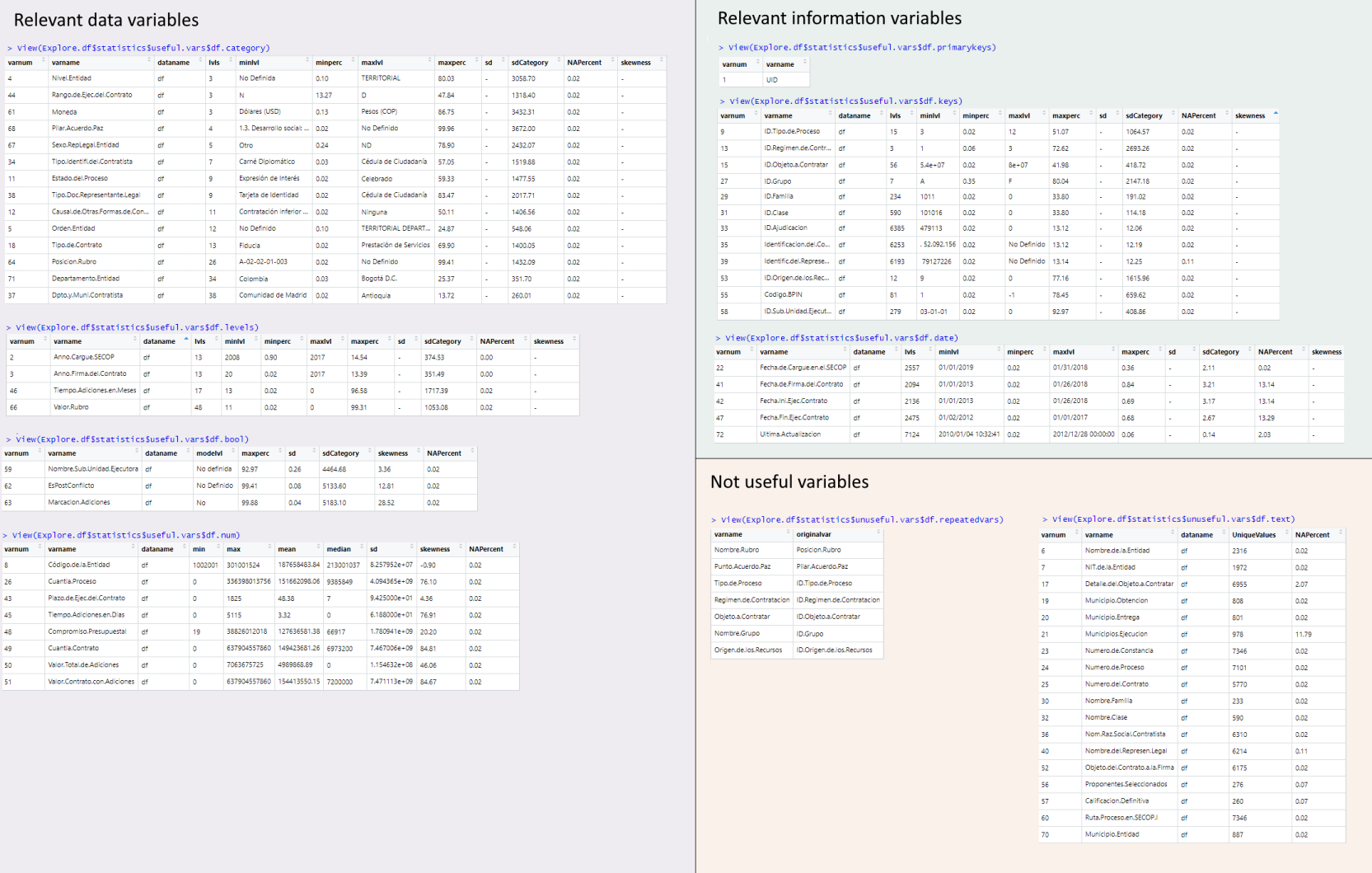
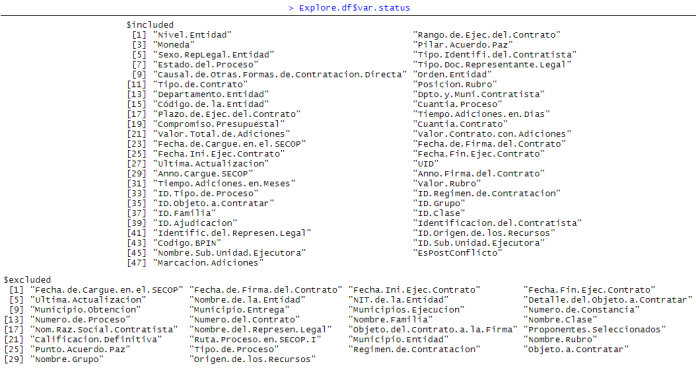
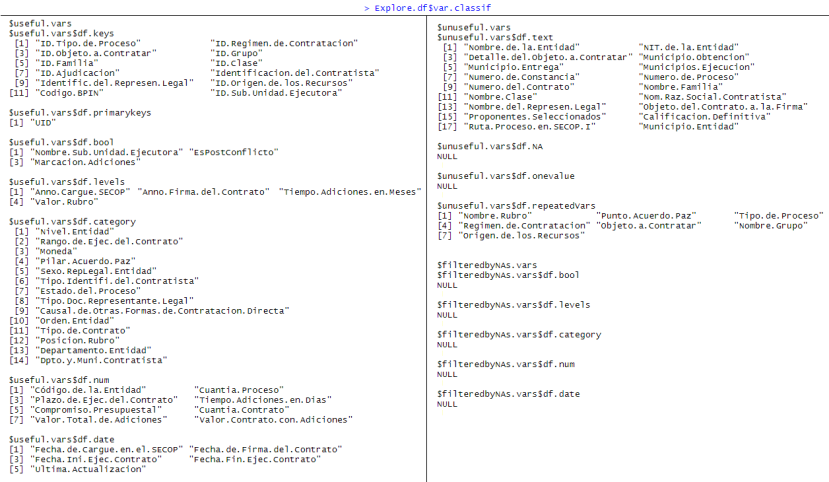
LDE.Explore() classifies the variables by its type and usefulness. It generates descriptive statistics, but doesn't transform the data. Useful for datasets of gygabytes, where the RAM is limited
df<-secop1.full                                                                          #Example dataset of government purchases included in this package. See full package info
keyNamesMatch <- c("key","id")                                                           #Variable names that start or end with these strings will be asigned as keys. E.g. c("key","id,"code"). String vector, or NULL to ignore.
Explore.df <- LDE.Explore(df,keyNamesMatch)
Explore.df$statistics | Explore.df$var.status | Explore.df$classif
:---------------------------:|:-------------------------:|:-------------------------:
 |
|  |
| 
Automatical exploration, variable filtering & re-formatting
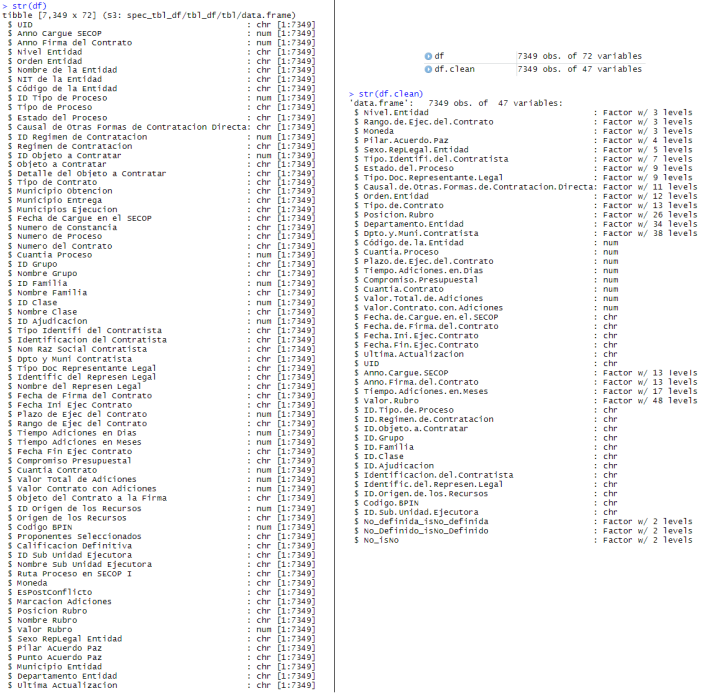
LDE.AutoProcess() returns a cleaned and reformatted dataset after removing unuseful varibles (It also returns statistics and classification)
df<-secop1.full
keyNamesMatch <- c("key","id")                                                           #See LDE.Explore()
Auto.df <- LDE.AutoProcess(df,keyNamesMatch)
df.clean <- Auto.df$df.filtered                                                          #Cleaned dataset
More
Author
Daniel Nieto-González - GitHub Profile - Send email
* CEO - Digital MedTools
nietodaniel/LargeDataExplorer documentation built on Sept. 20, 2020, 7:57 p.m.
R Package Documentation
Browse R Packages
We want your feedback!
Note that we can't provide technical support on individual packages. You should contact the package authors for that.
LargeDataExplorer
Powerful package to clean and re-format very large datasets after classifying its variables by their usefulness for machine learning. (Full Package Information)
Because summary() isn't enough when you have >200 columns and even GBs of data, and you can't easily know which variables have no relevant information
Installation & Loading
# install.packages("devtools")
library(devtools)
devtools::install_github("nietodaniel/LargeDataExplorer")
library(LargeDataExplorer)
Detected variable types
LargeDataExplorer can automatically classify the variables of a dataset within the following categories:
Relevant Data Vars | Relevant Information Vars | Unuseful Vars (To exclude) :---------------------------:|:-------------------------:|:--------------------------: Numeric | Primary keys | NAs Boolean | Keys and Ids | Uni-value Categoric (Numeric) | Dates | Text Categoric (Text) | | Repeated information
Variable exploration & classification, and descriptive statistics
LDE.Explore() classifies the variables by its type and usefulness. It generates descriptive statistics, but doesn't transform the data. Useful for datasets of gygabytes, where the RAM is limited
df<-secop1.full #Example dataset of government purchases included in this package. See full package info
keyNamesMatch <- c("key","id") #Variable names that start or end with these strings will be asigned as keys. E.g. c("key","id,"code"). String vector, or NULL to ignore.
Explore.df <- LDE.Explore(df,keyNamesMatch)
Explore.df$statistics | Explore.df$var.status | Explore.df$classif
:---------------------------:|:-------------------------:|:-------------------------:
| |
Automatical exploration, variable filtering & re-formatting
LDE.AutoProcess() returns a cleaned and reformatted dataset after removing unuseful varibles (It also returns statistics and classification)
df<-secop1.full
keyNamesMatch <- c("key","id") #See LDE.Explore()
Auto.df <- LDE.AutoProcess(df,keyNamesMatch)
df.clean <- Auto.df$df.filtered #Cleaned dataset
More
Author
Daniel Nieto-González - GitHub Profile - Send email * CEO - Digital MedTools
R Package Documentation
Browse R Packages
We want your feedback!
Note that we can't provide technical support on individual packages. You should contact the package authors for that.
Embedding an R snippet on your website
Add the following code to your website.
For more information on customizing the embed code, read Embedding Snippets.