This vignette demonstrates how to build a polyglot pipeline and assumes you've
read vignette("polyglot").
Running pipelines on GitHub Actions
Running pipelines on GitHub Actions is quite easy. First, run the rxp_ga()
function in your project's root. This will generate a GitHub Actions .yaml
file to run the pipeline on each push or pull request. Here are the different
steps that happen:
if previous run artifacts exist, those are restored to avoid recomputing them
using rixpress::rxp_import_artifacts();
required software is installed;
the execution environment is generated and built;
the rstats-on-nix cache is configured to decrease build times, see this
documentation
(ignore the part about installing Nix);
the pipeline is generated (and potentially built, depending on whether you set
build to FALSE in the rxp_populate() call);
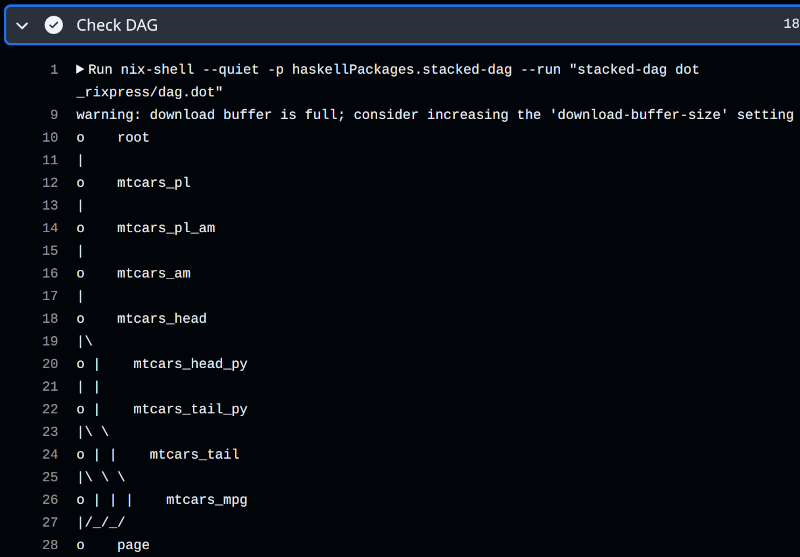
the DAG gets printed;
the pipeline is built: if you set build to TRUE previously, the build
process is skipped anyway;
the build artifacts and their paths are printed;
the build artifacts are archived for reuse using
rixpress::rxp_export_artifacts() for subsequent runs and are pushed to the
rixpress-runs branch.
Let me explain how to view the DAG in CI. In an interactive
session, you only need to call plot_dag() to see a graphical representation of
the pipeline. But in CI, since there's no graphical interface, you need to
use a tool that allows you to represent the pipeline in text mode. One such tool is
the stacked-dag package for the Haskell programming language. It takes an
igraph object as a .dot file, and returns a textual representation of the
DAG. So, there's a step in the .yaml file used to run the pipeline in CI that
does exactly this:
- name: Check DAG if dag.dot exists and show it if yes
  run: |
    if [ -f dag.dot ]; then
      nix-shell --quiet -p haskellPackages.stacked-dag --run "stacked-dag dot _rixpress/dag.dot"
    else
      echo "dag.dot not found"
    fi
As you can see, stacked-dag processes the file from the _rixpress/dag.dot
folder. When calling rxp_ga(), the rxp_dag_for_ci() function is called
automatically to generate the .dot file and put it in the right spot.