This vignette introduces key terminology and walks you through setting up a
simple pipeline using {rixpress}. Understanding the concepts presented here is
helpful but not mandatory. I recommend reading through this vignette, but don't
worry if you don't grasp everything immediately. You can try building a simple
pipeline by following the next vignette, vignette("core-functions"), and then
return to this one; things should become clearer after some hands-on experience!
Also, this package makes heavy use of its sister package {rix}, and I highly
recommend that you first get familiar with Nix by using {rix}. With {rix},
you'll learn how to set up reproducible development environments for data
science, which you can use for interactive data analysis work. Then, if you want
to go one step further in the reproducibility
spectrum/continuum^[https://doi.org/10.1126/science.1213847], this is where
{rixpress} comes in.
Definitions
In Nix terminology, a derivation is a specification for running an executable
on precisely defined input files to repeatably produce output files at uniquely
determined file system paths.
(source)
In simpler terms, a derivation is a recipe with precisely defined inputs, steps,
and a fixed output. This means that given identical inputs and build steps, the
exact same output will always be produced. To achieve this level of
reproducibility, several important measures must be taken:
All inputs to a derivation must be explicitly declared.
Inputs include not just data files, but also software dependencies,
configuration flags, and environment variables, essentially anything necessary
for the build process.
The build process takes place in a hermetic sandbox to ensure the exact same
output is always produced.
The next sections of this document explain these three points in more detail.
I won't go into details here, but what's important is that this code uses awk,
a common Unix data processing tool, to filter the mtcars.csv file to keep only
rows where the 9th column (the am column) equals 1. As you can see, a
significant amount of boilerplate code is required to perform this simple
operation. However, this approach is completely reproducible: the dependencies
are declared and pinned to a specific dated branch of our
rstats-on-nix/nixpkgs fork, and the only thing that could make this pipeline
fail (though it's a bit of a stretch to call this a pipeline) is if the
mtcars.csv file is not provided to it.
You could then add another step that uses filtered.csv as input and continue
processing it. If you label the above code as f and a subsequent chunk of Nix
code as g, then adding another step would essentially result in the following
computation: mtcars |> f |> g, where f and g are pure functions, and the
pipeline is thus a composition of pure functions.
Nix builds filtered.csv in two steps: it first generates a derivation from
this expression, and only then builds it. For clarity in this document, I'll
refer to code like the example above as a derivation rather than an
expression, to avoid confusion with the concept of expression in R.
The goal of {rixpress} is to help you write pipelines like mtcars |> f |> g
without needing to learn Nix, while still benefiting from its powerful
reproducibility features.
Dependencies of derivations
Nix requires the dependencies of any derivation to be explicitly listed and
managed by Nix itself. If you're building output that requires, for example,
Quarto, then Quarto must be explicitly listed as an input, even if you already
have Quarto installed on your system. The same applies to Quarto's dependencies,
and all the dependencies of those dependencies, all the way down to the common
ancestor of all packages. With Nix, to run a linear regression with R, you
essentially need to build the entire universe of dependencies first.
In Nix terms, this complete set of packages and their dependencies are what its
author, Eelco Dolstra, refers to as component closures:
The idea is to always deploy component closures: if we deploy a component,
then we must also deploy its dependencies, their dependencies, and so on. That
is, we must always deploy a set of components that is closed under the
''depends on'' relation. Since closures are self-contained, they are the units
of complete software deployment. After all, if a set of components is not
closed, it is not safe to deploy, since using them might cause other
components to be referenced that are missing on the target system.
(Nix: A Safe and Policy-Free System for Software Deployment, Dolstra et al., 2004).
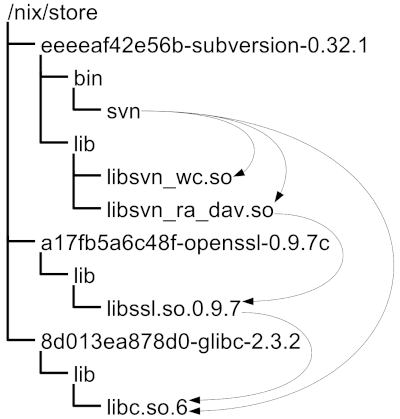
The figure below, from the same paper, illustrates this idea:
Figure 4 of Dolstra et al. (2004)
In the figure, subversion depends on openssl, which itself depends on
glibc. Similarly, if you write a derivation that builds a data frame by
filtering mtcars, this derivation requires:
An input file, such as mtcars.csv.
R and potentially R packages like {dplyr}.
All of R's dependencies and the dependencies of any R packages.
The dependencies of those dependencies (all the way down).
All of these must be managed by Nix. If any dependency exists "outside" this
component closure and is only available on your machine, then the pipeline will
only work on your machine - defeating the purpose of reproducibility! (It
should be noted, however, that there are sometimes good reasons to have a
dependency that is not managed by Nix, in which case you might prefer to use
{targets} running inside a Nix shell instead of {rixpress}, but these
situations should be the exception rather than the rule).
Nix distinguishes between different types of dependencies (buildInputs,
nativeBuildInputs, propagatedBuildInputs, propagatedNativeBuildInputs),
but let's skip this concept, which is only relevant for packaging upstream
software, not for defining our pipelines. But if you're curious, read
this.
The Nix store and hermetic builds
When building derivations, their outputs are saved into the Nix store.
Typically located at /nix/store/, this folder contains all the software and
build artifacts produced by Nix.
For example, if you write a derivation that computes the tail of a file named
mtcars.csv, once the derivation is built, its output would be stored at a path
like /nix/store/81k4s9q652jlka0c36khpscnmr8wk7jb-mtcars_tail. The long
cryptographic hash uniquely identifies the build output and is computed based on
the content of the derivation along with all its inputs and dependencies. This
ensures that the build is fully reproducible.
As a result, building the same derivation on two different machines will yield
the same cryptographic hash, and you can substitute the built artifact with the
derivation that generates it one-to-one. This is analogous to mathematics: if
you consider the function $f(x):= x^2$, then writing $f(2)$ or $4$ represents
the same value.
This mechanism is what makes it possible to import and export build artifacts
between pipelines to avoid having to rebuild everything from scratch on
different machines or on continuous integration platforms. {rixpress} has two
functions that allow this, called rxp_export_artifacts() and
rxp_import_artifacts().
To ensure that building derivations always produces exactly the same outputs,
builds must occur in an isolated environment, often referred to as a sandbox.
This approach, known as a hermetic build process, ensures that the build is
unaffected by external factors or the state of the host system.
This isolation extends to environment variables as well. For example, R users
might set the variable JAVA_HOME to make R aware of where the Java runtime is
installed. However, if Java is required for a derivation, setting JAVA_HOME
outside of the sandbox has no effect; it must be explicitly set within the
sandbox. This isolation also means that if you need to access an API to download
data, it won't work because no Internet connection is allowed from within the
build sandbox.
This may seem very restrictive, but it makes perfect sense if your goal is to
achieve complete reproducibility. Consider a scenario where you need to use a
function f() to access an API to get data for your analysis. What guarantee do
you have that running f() today will yield the same result as running f() in
six months or a year? Will the API even still be online?
For true reproducibility, you should obtain the data from the API once, then
version and archive it, and continue using this archived data for your analysis
(and share it with anyone who might want to reproduce your study).
Summary and conclusion
As explained at the beginning of this vignette, Nix generates a derivation from
a Nix expression through a process called instantiation. Writing a reproducible
pipeline with Nix directly would require writing very long and complex Nix
expressions. This is where {rixpress} comes in - it handles this complexity
for you.
During instantiation, Nix processes your declarations, resolves all inputs
(including source files, build scripts, and external dependencies), and computes
a unique cryptographic hash. This hash is derived from both the contents of your
derivation and its entire dependency graph, forming part of the derivation's
identity. This ensures that even the smallest change in your inputs will result
in a distinct derivation, guaranteeing reproducibility. To avoid confusion with
the concept of expression in R, throughout this documentation I refer to Nix
expressions as derivations.
Once instantiated, derivations can be built. During the build process, Nix
constructs an isolated, hermetic environment where only the explicitly declared
dependencies are available. This makes the build entirely deterministic, meaning
that identical inputs always produce identical outputs, regardless of the
machine or environment. This isolation improves reliability and facilitates
debugging and maintenance by eliminating external variables.
After a successful build, Nix stores the output in the Nix store (typically at
/nix/store/). For example, if you build a derivation that processes the
mtcars.csv file, the output might be saved under a unique path like
/nix/store/81k4s9q652jlka0c36khpscnmr8wk7jb-mtcars_tail. The cryptographic
hash is computed based on the derivation's inputs and build process. If
anything changes, the hash will be different. This is extremely precise - even
changing the separator in the mtcars.csv data set from , to | will result
in a different hash, even though the resulting mtcars_tail object might look
identical to us. From Nix's perspective, they're different because one of the
inputs was different.
The key take-away is that Nix is a complex tool because it solves a complex
problem: ensuring complete reproducibility across different environments
and time. {rixpress} and {rix} are packages designed to make Nix more
accessible to R users, allowing you to benefit from Nix's reproducibility
without having to learn all its complexities.
Now that you're familiar with the basic Nix concepts, let's move on to the next
vignette where you'll set up your first basic pipeline:
vignette("core-functions") (if you wish to learn more about the scope and roadmap
of the package, you can also take a look at vignette("scope") first).