In tjtnew/reportfactory: Lightweight Infrastructure for Handling Multiple Rmarkdown Documents
knitr::opts_chunk$set(
  collapse = TRUE,
  comment = "#>",
  fig.path = "man/figures/README-",
  out.width = "100%"
)


Welcome to reportfactory!
NOTE
This version of {reportfactory} works in a very different way to the previous
unreleased version. For those already using {reportfactory} in their pipelines
you can obtain the old version using the {remotes} package:
remotes::install_github("reconhub/reportfactory@old_version")
You can also download it directly from
https://github.com/reconhub/reportfactory/releases/tag/old_version.
reportfactory in a nutshell
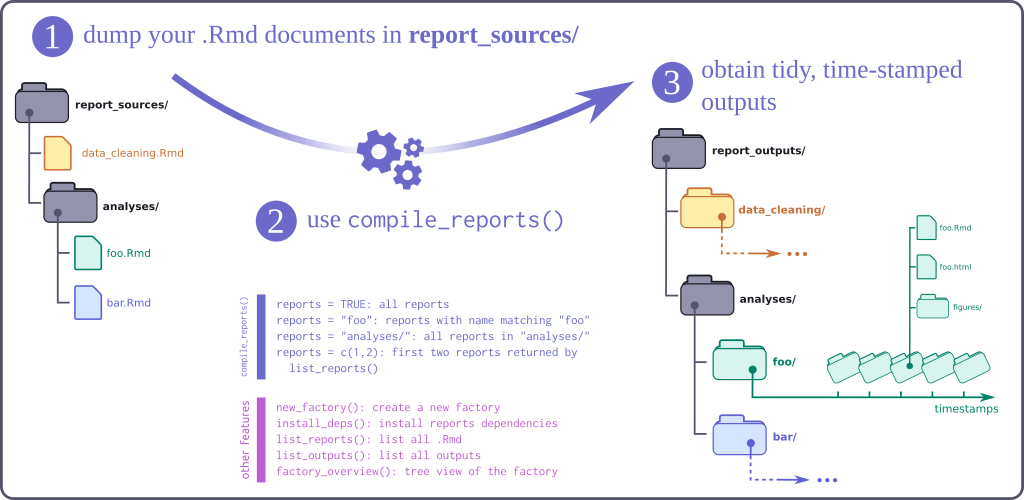
{reportfactory} is a R package which facilitates a workflow for compiling
multiple .Rmd reports within a folder.
There a few key principles it adheres to:
- Simplicity Only focusses on the compilation of reports not data management.
- Reproducible Time-stamped folder structure and customisable subfolder make
viewing the same report over time a breeze.
- Time-saving Easy convenience functions to reports based on regular
expressions.
Installing the package
To install the development version of the package, use:
remotes::install_github("reconhub/reportfactory")
Quick start
Step 1 - Create a new factory
Create and open a new factory. Here, we create the factory with mostly the
default settings but stay in our current working directory (set move_in to
TRUE to switch directories).
library(reportfactory)
new_factory("my_factory", path = tempdir())
knitr::opts_knit$set(root.dir = fs::path(tempdir(), "my_factory"))
Step 2 - Add your reports
Here we've already created some with most of the default arguments being set to
TRUE (the default). These default settings include both an example report and
some associated data (report_sources/example_report.Rmd and
data/raw/example_data.csv). The helper functions below show the state of the
factory.
list_reports()       # list all available report sources
list_deps()          # list all of the dependencies of the reports
list_outputs()       # currently empty
Step 3 - Compile report(s)
The compile_reports() function can be used to compile a report using regular
expressions matched against the full filename of reports within the factory.
This ability to use of regular expressions is useful when you're actively
working on developing your reports but once the factory is setup we recommend
passing full filenames to the function so it is always clear what will be built.
compile_reports(
  reports = "example_report.Rmd"
)
Use list_ouputs() to view the report outputs.
list_outputs()
compile_reports() can also be used to pass a set of parameters to use with a
parameterised report (here we use a subfolder argument to distinguish the
parameterised reports).
compile_reports(
  reports = "example_report.Rmd",
  params = list(grouped_plot = FALSE),
  subfolder = "regional"
)
list_outputs()
If you want to have an overview of your entire factory then you can use the
fs package and the dir_tree function:
fs::dir_tree()
Contributing guidelines
Contributions are welcome via pull requests.
Code of Conduct
Please note that the reportfactory project is released with a
Contributor Code of Conduct.
By contributing to this project, you agree to abide by its terms.
tjtnew/reportfactory documentation built on Dec. 31, 2020, 8:40 a.m.
R Package Documentation
Browse R Packages
We want your feedback!
Note that we can't provide technical support on individual packages. You should contact the package authors for that.
knitr::opts_chunk$set( collapse = TRUE, comment = "#>", fig.path = "man/figures/README-", out.width = "100%" )
Welcome to reportfactory!
NOTE
This version of {reportfactory} works in a very different way to the previous unreleased version. For those already using {reportfactory} in their pipelines you can obtain the old version using the {remotes} package:
remotes::install_github("reconhub/reportfactory@old_version")
You can also download it directly from https://github.com/reconhub/reportfactory/releases/tag/old_version.
reportfactory in a nutshell
{reportfactory} is a R package which facilitates a workflow for compiling
multiple .Rmd reports within a folder.
There a few key principles it adheres to:
- Simplicity Only focusses on the compilation of reports not data management.
- Reproducible Time-stamped folder structure and customisable subfolder make viewing the same report over time a breeze.
- Time-saving Easy convenience functions to reports based on regular expressions.
Installing the package
To install the development version of the package, use:
remotes::install_github("reconhub/reportfactory")
Quick start
Step 1 - Create a new factory
Create and open a new factory. Here, we create the factory with mostly the
default settings but stay in our current working directory (set move_in to
TRUE to switch directories).
library(reportfactory) new_factory("my_factory", path = tempdir())
knitr::opts_knit$set(root.dir = fs::path(tempdir(), "my_factory"))
Step 2 - Add your reports
Here we've already created some with most of the default arguments being set to
TRUE (the default). These default settings include both an example report and
some associated data (report_sources/example_report.Rmd and
data/raw/example_data.csv). The helper functions below show the state of the
factory.
list_reports() # list all available report sources list_deps() # list all of the dependencies of the reports list_outputs() # currently empty
Step 3 - Compile report(s)
The compile_reports() function can be used to compile a report using regular
expressions matched against the full filename of reports within the factory.
This ability to use of regular expressions is useful when you're actively working on developing your reports but once the factory is setup we recommend passing full filenames to the function so it is always clear what will be built.
compile_reports( reports = "example_report.Rmd" )
Use list_ouputs() to view the report outputs.
list_outputs()
compile_reports() can also be used to pass a set of parameters to use with a
parameterised report (here we use a subfolder argument to distinguish the
parameterised reports).
compile_reports( reports = "example_report.Rmd", params = list(grouped_plot = FALSE), subfolder = "regional" ) list_outputs()
If you want to have an overview of your entire factory then you can use the
fs package and the dir_tree function:
fs::dir_tree()
Contributing guidelines
Contributions are welcome via pull requests.
Code of Conduct
Please note that the reportfactory project is released with a Contributor Code of Conduct. By contributing to this project, you agree to abide by its terms.
R Package Documentation
Browse R Packages
We want your feedback!
Note that we can't provide technical support on individual packages. You should contact the package authors for that.
Embedding an R snippet on your website
Add the following code to your website.
For more information on customizing the embed code, read Embedding Snippets.