Nothing
README.md
In link2GI: Linking Geographic Information Systems, Remote Sensing and Other Command Line Tools
link2GI






Package website: release
link2GI provide some functions which make it a bit easier to connect
straightforward the common open source GI software packages to the
R-biotop. It supports both the use of wrapper packages and the direct
API-use via system calls. It focuses on Linux and WindowsX operating
systems but nevertheless it should also work with OSX.
If you have several versions installed or if you want to use the full
power of the GI software it will be a nice and helpful tool to deal with
some strange behaviours and requirements. Especially helpful is the
support of OTB, the GDAL-Python functions and a simple support to
use any SAGA version via the CLI. Hopefully RSAGA and Rsagacmd
will join forces in one package in the future. Anyway the current
releases (1.4.1) of RSAGA as well as Rsagacmd will work with the
environment settings as provided by linkSAGA.
Installation
link2GIis up to CRAN. For the installation of the stable version
please use install.packages("link2GI").
However it is strongly recommended to install the latest stable version:
# devtools package
devtools::install_github("r-spatial/link2GI", ref = "master")
# remotes package
remotes::install_github("r-spatial/link2GI",ref = "master")
Third Party software
To utilize the power of the open source GI tools from within R you
need to install them first. As a first promising opportunity to do
fulfill most of the requirements you may install QGIS, GRASS,
SAGA-GIS and Orfeo-toolbox. For further Information have a look at
the Installation guide for link2GI related
Software.
New Features
OTB wrapper
The OTB integration in link2GI has evolved from a basic command wrapper into
a robust, Self-describing CLI interface. It now derives valid parameters directly
from OTB’s CLI metadata, supports version-stable command construction, and
enforces explicit, reproducible, on-disk outputs (OTB Wrapper in link2GI.).
initProj for reproducible projects
initProj provides a lightweight but robust setup for reproducible GI projects.
It creates a clear folder structure, initial scripts, configuration templates,
and optionally a Git repository and an renv environment. An RStudio project
file is generated automatically, supporting fast and consistent project startup.
The function generates a minimal workflow skeleton
(main-control.R, pre-processing.R, processing.R, post-processing.R)
with YAML-based configuration files in src/configs/.
All project-specific settings are centralized in
src/functions/000_settings.R.
Project paths are exposed via a single dirs list, enabling simple,
reproducible data handling.
For details, see the article Reproducible Projects.
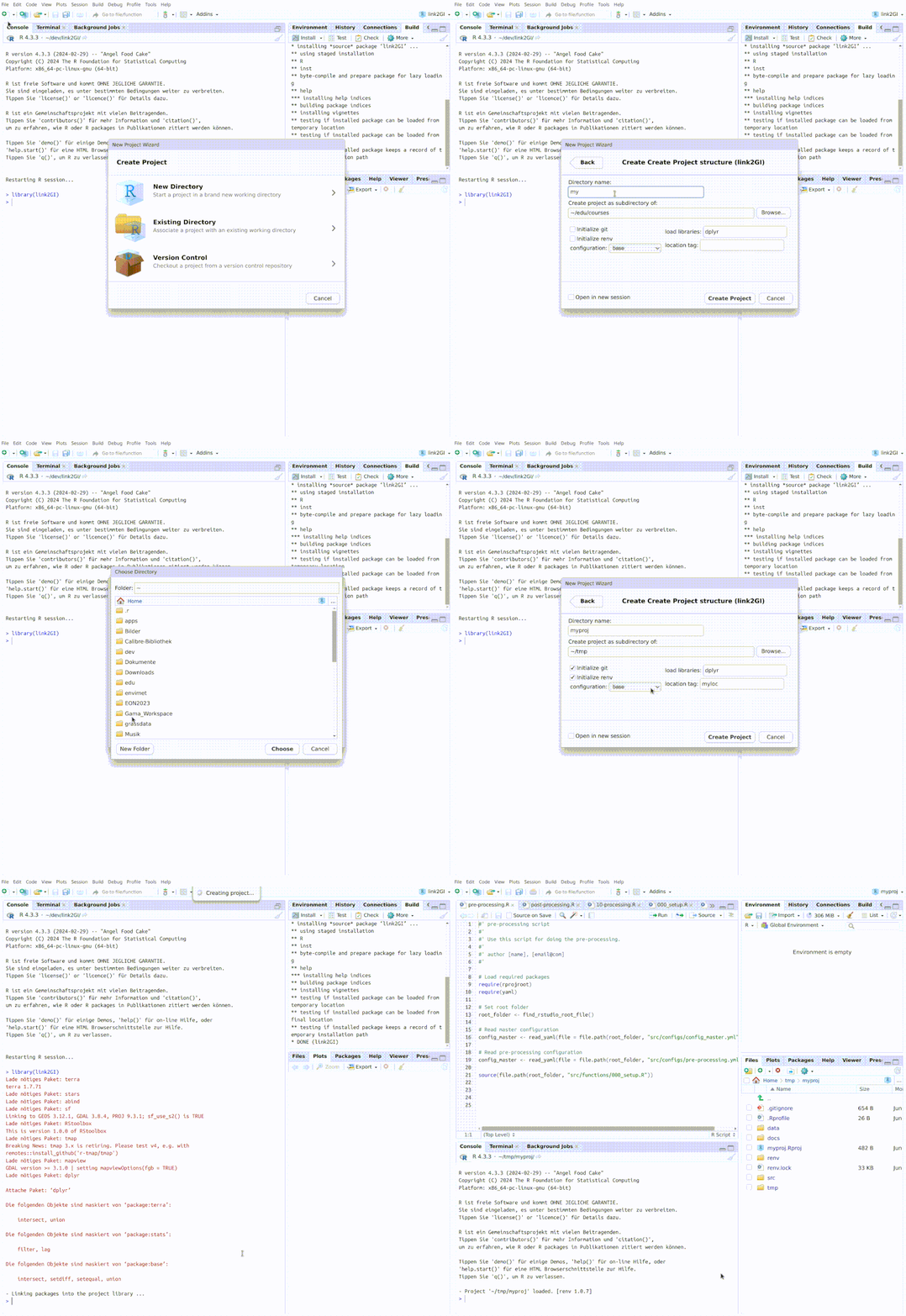
In RStudio, a new project can be created via
File → New Project → New Directory → Create Project Structure (link2GI).
Try the link2GI package in your browser
Any scripts or data that you put into this service are public.
link2GI documentation built on Dec. 23, 2025, 9:09 a.m.
R Package Documentation
Browse R Packages
We want your feedback!
Note that we can't provide technical support on individual packages. You should contact the package authors for that.
link2GI
Package website: release
link2GI provide some functions which make it a bit easier to connect
straightforward the common open source GI software packages to the
R-biotop. It supports both the use of wrapper packages and the direct
API-use via system calls. It focuses on Linux and WindowsX operating
systems but nevertheless it should also work with OSX.
If you have several versions installed or if you want to use the full
power of the GI software it will be a nice and helpful tool to deal with
some strange behaviours and requirements. Especially helpful is the
support of OTB, the GDAL-Python functions and a simple support to
use any SAGA version via the CLI. Hopefully RSAGA and Rsagacmd
will join forces in one package in the future. Anyway the current
releases (1.4.1) of RSAGA as well as Rsagacmd will work with the
environment settings as provided by linkSAGA.
Installation
link2GIis up to CRAN. For the installation of the stable version
please use install.packages("link2GI").
However it is strongly recommended to install the latest stable version:
# devtools package
devtools::install_github("r-spatial/link2GI", ref = "master")
# remotes package
remotes::install_github("r-spatial/link2GI",ref = "master")
Third Party software
To utilize the power of the open source GI tools from within R you
need to install them first. As a first promising opportunity to do
fulfill most of the requirements you may install QGIS, GRASS,
SAGA-GIS and Orfeo-toolbox. For further Information have a look at
the Installation guide for link2GI related
Software.
New Features
OTB wrapper
The OTB integration in link2GI has evolved from a basic command wrapper into a robust, Self-describing CLI interface. It now derives valid parameters directly from OTB’s CLI metadata, supports version-stable command construction, and enforces explicit, reproducible, on-disk outputs (OTB Wrapper in link2GI.).
initProj for reproducible projects
initProj provides a lightweight but robust setup for reproducible GI projects.
It creates a clear folder structure, initial scripts, configuration templates,
and optionally a Git repository and an renv environment. An RStudio project
file is generated automatically, supporting fast and consistent project startup.
The function generates a minimal workflow skeleton
(main-control.R, pre-processing.R, processing.R, post-processing.R)
with YAML-based configuration files in src/configs/.
All project-specific settings are centralized in
src/functions/000_settings.R.
Project paths are exposed via a single dirs list, enabling simple,
reproducible data handling.
For details, see the article Reproducible Projects.
In RStudio, a new project can be created via File → New Project → New Directory → Create Project Structure (link2GI).
Try the link2GI package in your browser
Any scripts or data that you put into this service are public.
R Package Documentation
Browse R Packages
We want your feedback!
Note that we can't provide technical support on individual packages. You should contact the package authors for that.
Embedding an R snippet on your website
Add the following code to your website.
For more information on customizing the embed code, read Embedding Snippets.